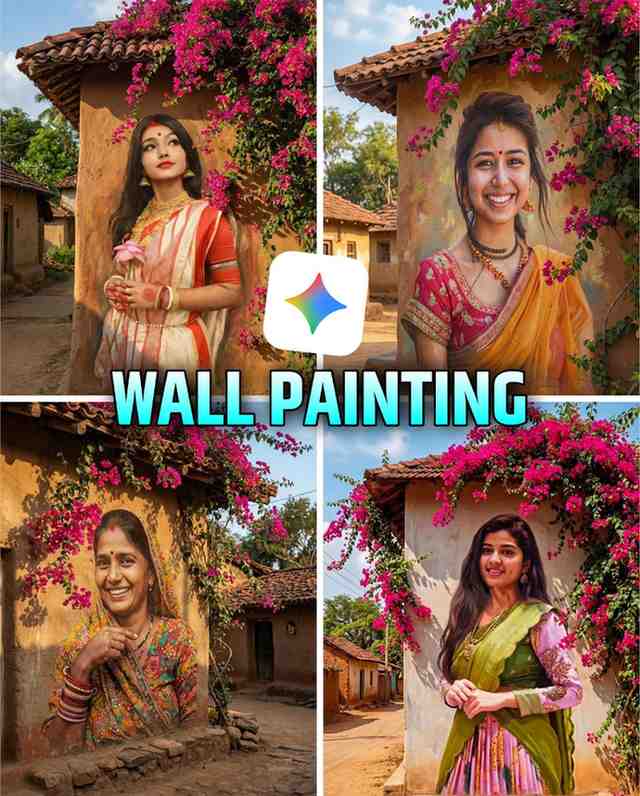
Have you ever seen those beautiful pictures on social media, especially on Instagram, created with a wall painting photo editing google gemini prompt? They look like your photo was carefully painted by an artist right onto a mud wall! And did you wonder how these trending pictures are made? You might think, “Oh! If only I could make such a picture too!” Don’t worry! I understand your problem completely.
When people first try to make these kinds of pictures, they often feel confused. They don’t know the right prompt (the instruction) to use, where to type it, or which app gives such a beautiful result in one click. I faced the same problems when I started! But I promise you, this article has the solution to all your problems.
Today, I will show you how you can use the amazing AI power of Google Gemini to create this viral wall painting photo editing in just one minute! You will just use a simple prompt, and instantly your normal picture will turn into a wonderful piece of art.
What is Wall Painting Photo Editing?
When a digital picture is edited so that it looks like it was hand-painted onto a wall or a surface—especially a mud wall or a brick wall—that is called wall painting photo editing. In this editing, the details of the picture, like the wall’s texture, the colors used, and the finishing, are made to look so real that it feels completely authentic. Now, you can easily do this kind of work using google gemini trending 3d ai photo editing tools. Just imagine, how wonderful would it be if your favorite picture could be brought to life with a village background, beautiful creeping flower plants (with pink or red flowers), and the feel of a mud house? This trend is so popular now that if you don’t know how to create it, you might fall behind on social media. This is not just editing; it gives your picture a unique artistic touch.
Wall Painting Photo Editing Google Gemini Prompt
Using the correct google gemini prompt is the main key to this editing. When I first tried to do this, I couldn’t get the picture I wanted even after trying a hundred times. Sometimes the prompt was wrong, and sometimes the AI made a different picture. But after much research and testing, I found a special prompt that gives the best results. Below, I am giving you that prompt. It will give your picture a beautiful wall painting effect on a mud wall with creeping flower plants. When writing gemini wall painting ai photo editing prompts, remember that the more detail you give, the more perfect the picture will be. Try using this prompt, and you will see the difference yourself.

Turn the uploaded photo into a large, hand-painted mural on a rustic village wall with Brush paining effect. Preserve the exact face and expression. Add vibrant pink bougainvillea flowers cascading from the roof, wrapping naturally around the mural. Use warm sunlight, soft shadows, and earthy tones of mud houses in the background. Maintain high realism with a slight artistic mural texture on the wall. Blend the portrait seamlessly into the surface as if painted on it. Create a natural village street environment with clay tiles, sky, and greenery. Bright, colorful, authentic rural aesthetic, image ratio 3:4How to Create Wall Painting Photo Editing
You might be thinking that making these kinds of pictures is a very difficult task. But believe me, creating a picture using a wall painting photo editing google gemini prompt is so easy that even a five-year-old child can do it! At first, I was scared, thinking, “How will I do such technical work?” But once I knew the method, I thought, “Wow! This is so simple!” Below, I explain the easy steps:
- First, copy the google gemini trending girl photo editing prompt that you like.
- Open the Google Gemini app on your phone.
- Click on the
+option at the bottom of the screen. Then, select the picture you want to edit from your Gallery and upload it. - Now, paste the prompt you copied into the writing box (Chat Box).
- After pasting the prompt, press the Send button.
- In a short time, the AI will change your picture into a beautiful wall painting according to the prompt’s instruction!
By following this easy and small method, you can very simply, without any trouble, create your desired wall painting photo editing.
Why Viral Wall Painting Photo Editing
There are many reasons why this wall painting photo editing has become so viral so quickly. First, it gives a great nostalgic look. In modern times, seeing a picture hand-painted on a mud wall is a kind of art. Second, these pictures are very easy to create. google gemini viral photo editing tools are so smart that they do the job in a few seconds. Third, there is always a demand for new things on social media. When a normal picture is edited and turned into a unique artwork, it catches people’s attention and quickly starts to be shared. Along with that, the creeping flower plants and the finishing of the mud house create a beautiful and peaceful environment in the picture, which is very attractive to viewers. This is why many people are making and sharing their pictures using trending google gemini photo editing.
Gemini Free vs Pro – Which one is Best for You?
Currently, within the Gemini app, you get the benefit of editing pictures both for free and with a premium plan. When I first started, I managed many tasks using the Free Plan, but later when I saw that I needed the Pro Plan for some special benefits, I looked into it. It depends on your financial situation and your needs which one you choose.
| Feature | Free Plan | Pro Plan |
| Cost | $0 (Free) | Fixed Monthly or Yearly Subscription Fee |
| Picture Creation Speed | Might be a bit slow | Much faster and gets priority |
| AI Model Power | Benefits of the Standard Model | Advanced power of the Gemini Advanced Model |
| Professional Output | Creates good quality pictures | More professional and finer details |
| Price in India (Estimate) | Free | Determined according to gemini plans pricing india |
There can be separate packages for gemini plans pricing and gemini plans for students or businesses, which you can find on their official website. If you want to do this google gemini photo editing just for fun, the Free Plan is enough. But if you are a Content Creator or want to create high-quality and fast pictures for your business, you can consider the Premium Plan. Remember, gemini plans comparison should always be based on your purpose of use.
Features
- Full HD Quality
- Free to use
- No Watermark
- Premium prompt support
- Easy to use interface
- Quick processing time
- High level of detail and texture
- Customizable artistic styles
- Diverse background options
- Regular updates and new features
My Real Experience: Problems and Solutions
When I first started creating pictures using this wall painting photo editing google gemini prompt, I faced a big problem. Whenever I wrote ‘Mud Wall’ in the prompt, the picture would either come out blurry or the details of the wall were not clear at all. I felt like maybe I wouldn’t be able to do this editing. But I did not give up. I understood that I shouldn’t just say ‘Mud Wall’ to the AI; I needed to be more detailed.
After that, I added more descriptions to the prompt like ‘Rustic Mud Wall with High Texture’, ‘Vibrant Pink and Red Climbing Flowers’, and ‘Daylight’s Soft Glow’. As a result, I saw that the quality of the picture changed unbelievably. The picture became completely clear and realistic! From this experience, I learned that for trending girls ai photo editing in google gemini, the more detailed and clear the prompt is, the better the result will be. The prompt I have given you now is created from my real experience, so you can be sure it will give you the best results.
Conclusion
In this article, we saw how a simple picture can be turned into an extraordinary piece of art using a wall painting photo editing google gemini prompt. You now know the right prompt for gemini wall painting photo editing, how to use it, and why this google gemini ai photo editing is so popular. By using this easy technique, you too can make your social media feed attractive. If you follow all the steps correctly, the picture you create will surely catch everyone’s attention.
All my work, my knowledge, and the opportunity I got to teach you something new—all of this is due to Maa Monosha blessing (Joy Maa Monosha). I know your blessing will always be with me, and you will always support me on this path to success. Thank you, Maa, thank you.